Uncovering hidden themes in chatgpt tweets using unsupervised topic modeling
In the last couple of years, ChatGPT has become one of the most discussed technologies online. Conversations about its potential, its risks, and the ways people are using it show up everywhere, but nowhere as quickly and openly as on Twitter. With thousands of tweets posted every day, the challenge is no longer finding opinions, it is making sense of them. That is where machine learning can transform something chaotic into something useful.
For this project, I decided to analyze a large collection of ChatGPT-related tweets published between January and March 2023. Instead of reading individual comments or relying on a few viral posts, I wanted to take a more systematic approach: use an unsupervised model to identify the themes that naturally emerge from a massive amount of text. If we can summarize thousands of tweets into a handful of coherent topics, we gain a clearer view of what people are actually discussing, not just what appears in isolated examples.
Topic modeling is a strong candidate for this task. Models like LDA (Latent Dirichlet Allocation) and NMF (Non-Negative Matrix Factorization) are designed to uncover hidden structures in large text datasets. They can reveal patterns about how people frame a technology, what ideas dominate the conversation, and which concerns or opportunities appear repeatedly. In the context of chatgpt, understanding these themes is especially relevant because the technology moves fast, public perception shifts constantly, and organizations are trying to understand how users interpret its impact.
To explore these questions, I followed a simple and reproducible workflow:
- Import the necessary Python libraries
- Load the data into Google Colab
- Clean and preprocess the text
- Create the document–term matrix using TF-IDF or CountVectorizer
- Train LDA and NMF to extract the main topics
- Interpret the resulting themes with supporting examples
- Close with key observations and conclusions
- Import the necessary Python libraries
My goal is to show how a machine-learning model can summarize a large volume of unstructured text and convert it into insights that are easier to understand and communicate. By uncovering the themes behind thousands of tweets, we get a more accurate picture of how the public talks about chatgpt, not through isolated opinions, but through patterns that emerge from the collective conversation.
# Basic data handling
import pandas as pd
import numpy as np

# Text preprocessing
import re
import nltk
from nltk.corpus import stopwords
from nltk.stem import WordNetLemmatizer

# Vectorization
from sklearn.feature_extraction.text import CountVectorizer, TfidfVectorizer

# Topic Modeling
from sklearn.decomposition import NMF
from gensim import corpora
from gensim.models.ldamodel import LdaModel

# Visualization
import matplotlib.pyplot as plt
from wordcloud import WordCloud

# Download NLTK resources (if not already available)
nltk.download('stopwords')
nltk.download('wordnet')
In this section I import all the Python libraries needed for the project. Pandas and NumPy will help me inspect and organize the dataset. NLTK provides useful tools for text preprocessing, including stopwords and lemmatization. For the vectorization step, I load both CountVectorizer and TfidfVectorizer, since LDA works better with a simple bag-of-words approach while NMF performs well with TF-IDF. I also import the topic-modeling classes from scikit-learn and Gensim, which I will use to train the NMF and LDA models. Finally, I include basic visualization libraries to generate word clouds and other plots that help interpret the topics.
2. Load the data into Google Colab
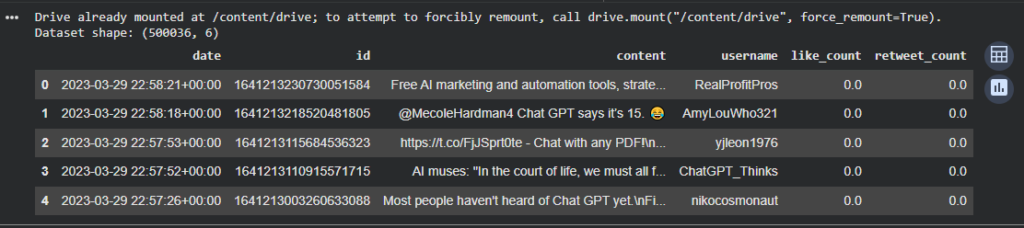
In this step I load the dataset into Google Colab so I can start exploring it. After mounting Google Drive, I point to the CSV file that contains the ChatGPT-related tweets. I use pandas.read_csv() to read the file and then display the shape and first few rows to confirm that the data loaded correctly. This quick inspection helps me understand the structure of the dataset, verify column names such as date, content, username, and like_count, and ensure that the file is ready for preprocessing.
# Load the dataset from your Google Drive or local upload

# If using Google Drive:
from google.colab import drive
drive.mount('/content/drive')

# Replace this path with the exact location of your file
file_path = '/content/drive/MyDrive/Colab Notebooks/chatgpt-related-tweetsJan-Mar2023.csv'

# Load the dataset
df = pd.read_csv(file_path)

# Display the shape of the dataset
print("Dataset shape:", df.shape)

# Show the first 5 rows
df.head()
3. Clean and preprocess the text
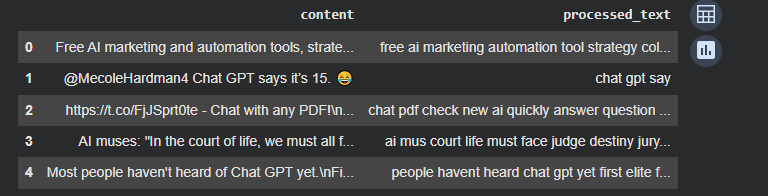
In this step I prepare the text for topic modeling by applying a series of cleaning operations. I convert everything to lowercase, remove URLs, mentions, hashtags, and any non-alphabetic characters. This helps reduce noise and keeps the vocabulary consistent. Then I remove English stopwords such as “the”, “and”, “but”, which do not contribute meaning to the topics. Finally, I lemmatize each word so that variations like “running”, “runs”, and “ran” are reduced to the same base form. The result is a clean and standardized version of every tweet that can be used to build the document–term matrix for both LDA and NMF.
# Keep only the text column we need
texts = df['content'].astype(str)

# Function to clean each tweet
def clean_text(text):
    text = text.lower()                                      # lowercase
    text = re.sub(r'http\S+', '', text)                      # remove URLs
    text = re.sub(r'@\w+', '', text)                         # remove mentions
    text = re.sub(r'#\w+', '', text)                         # remove hashtags
    text = re.sub(r'[^a-zA-Z\s]', '', text)                  # keep only letters
    text = re.sub(r'\s+', ' ', text).strip()                 # normalize spaces
    return text

# Apply cleaning
df['clean_text'] = texts.apply(clean_text)

# Download stopwords if not available
nltk.download('stopwords')
stop_words = set(stopwords.words('english'))

# Initialize lemmatizer
lemmatizer = WordNetLemmatizer()
nltk.download('wordnet')

# Remove stopwords + lemmatize
def preprocess(text):
    tokens = text.split()
    tokens = [w for w in tokens if w not in stop_words]      # stopword removal
    tokens = [lemmatizer.lemmatize(w) for w in tokens]       # lemmatization
    return " ".join(tokens)

df['processed_text'] = df['clean_text'].apply(preprocess)

# Show sample rows
df[['content', 'processed_text']].head()
4. Create the document–term matrix using TF-IDF or CountVectorizer
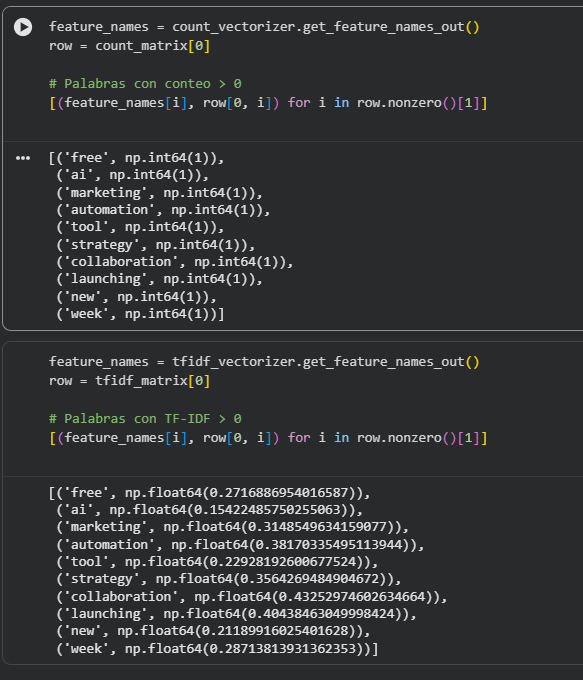
In this step I convert the cleaned tweets into numerical matrices that can be used by the topic-modeling algorithms. For the LDA model, I use a CountVectorizer to create a bag-of-words representation where each entry counts how many times each term appears in a tweet. For the NMF model, I use TF-IDF, which reduces the weight of very common words and highlights more distinctive terms.
I also apply max_df and min_df thresholds to remove extremely frequent or extremely rare words, since those do not help create meaningful topics. The result is two matrices, one for LDA and one for NMF, that capture the structure of the text in numerical form.
# ---------------------------
# 1. Vectorization for LDA
# ---------------------------

# CountVectorizer for bag-of-words representation
count_vectorizer = CountVectorizer(
    max_df=0.95,          # ignore extremely common terms
    min_df=20,            # ignore very rare terms
    stop_words='english'
)

count_matrix = count_vectorizer.fit_transform(df['processed_text'])

print("Count matrix shape:", count_matrix.shape)


# ---------------------------
# 2. Vectorization for NMF
# ---------------------------

# TF-IDF representation
tfidf_vectorizer = TfidfVectorizer(
    max_df=0.95,
    min_df=20,
    stop_words='english'
)

tfidf_matrix = tfidf_vectorizer.fit_transform(df['processed_text'])

print("TF-IDF matrix shape:", tfidf_matrix.shape)

LDA works best with simple word counts because it tries to answer a basic question: “How often does each word appear, and what topics could explain those patterns?” It needs the raw frequencies the way they naturally occur, because it builds topics by looking at how words are shared across many documents. If we gave LDA TF-IDF instead of counts, we would be altering those natural frequencies and the model would no longer represent the real distribution of words.
NMF works differently. It tries to break the text into parts that explain the data, and for that reason TF-IDF is more helpful. TF-IDF does not just count words, it highlights the ones that are informative. It reduces the weight of very common words and emphasizes the terms that actually help separate one topic from another. This gives NMF a cleaner signal, which often leads to sharper and more distinct topics.
In simple terms, CountVectorizer gives LDA the type of information it was designed to use. TF-IDF gives NMF the type of information that makes its topics easier to interpret. Both models look at the same text, but each one benefits from a different way of representing the words.
5. Train LDA and NMF to extract the main topics
In this step I train the LDA model using the matrix of word counts. LDA assumes that each tweet is a mixture of topics, and each topic is a mixture of words. The model looks at how words co-occur across all tweets and then discovers patterns that represent underlying themes. I set the number of topics to eight, which is a good starting point for a dataset this size. After training the model, I print the top words for each topic, since these keywords help interpret what each theme represents.
# Number of topics to extract
num_topics = 8

# Build dictionary and corpus for LDA
corpus = corpora.MatrixCorpus((count_matrix.T))
id2word = dict((i, s) for i, s in enumerate(count_vectorizer.get_feature_names_out()))

# Train the LDA model
lda_model = LdaModel(
    corpus=corpus,
    id2word=id2word,
    num_topics=num_topics,
    passes=5,
    random_state=42
)

# Display the top words for each topic
for i, topic in lda_model.show_topics(num_topics=num_topics, num_words=10, formatted=False):
    print(f"Topic #{i}:")
    print([word for word, prob in topic])
    print()
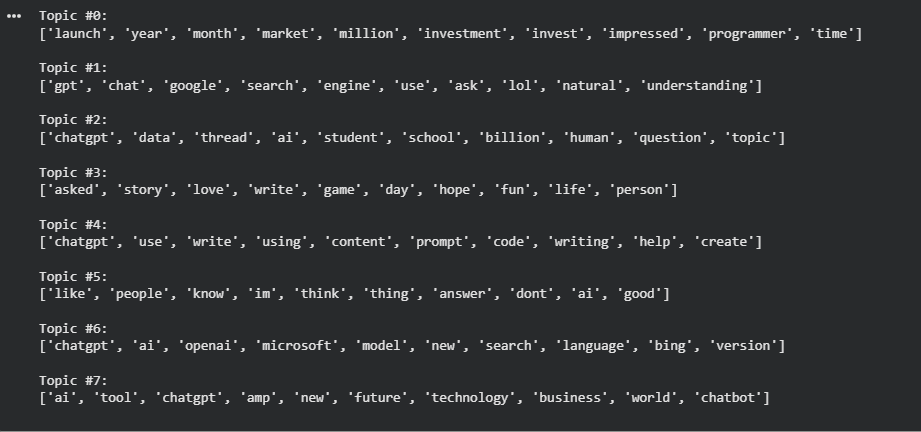
After training the LDA model, several recurring themes emerge from the conversation around ChatGPT. The model groups words based on how frequently they appear together across thousands of tweets, allowing us to see the main directions in which the public discussion naturally clusters. Instead of focusing on individual opinions, LDA helps summarize large volumes of text into broader topic families. These topics are not perfectly separated, and some overlap is expected, especially in a dataset where terms like “AI” and “ChatGPT” are very common. Still, the results provide a useful high-level view of how people talk about this technology.
Below are the main topics identified by the LDA model, along with a short interpretation for each one
Topic 0 – Market Impact and Investment Hype
This topic reflects conversations about product launches, market reactions, investments, and the perceived economic impact of ChatGPT. It captures the hype around adoption, growth, and business opportunities.
Topic 1 – ChatGPT as a Search Engine Alternative
Here the discussion revolves around comparing ChatGPT to Google and traditional search engines. Users talk about asking questions, understanding answers, and using ChatGPT as a new way to search for information.
Topic 2 – Education and Learning Use Cases
This topic focuses on students, schools, questions, and structured discussions. It highlights how ChatGPT is being mentioned in educational contexts and learning-related conversations.
Topic 3 – Personal Stories and Casual Sharing
These tweets are more informal and personal. They include storytelling, entertainment, writing for fun, and everyday experiences where ChatGPT is mentioned in a casual way.
Topic 4 – Prompting, Writing, and Content Creation
This topic captures practical use cases such as writing, coding, prompting, and creating content. It reflects how users interact directly with ChatGPT as a productivity tool.
Topic 5 – General Opinions and Reactions
This is a broad topic that includes personal opinions, reactions, and general thoughts. It reflects how people feel about ChatGPT without focusing on a specific use case.
Topic 6 – Big Tech Ecosystem and Product Updates
This topic centers on companies like OpenAI and Microsoft, product versions, language models, and integrations such as Bing. It reflects news and ecosystem-related discussions.
Topic 7 – Business, Technology, and the Future of AI
Here the conversation is more forward-looking. Users discuss AI tools, business impact, technology trends, and the future role of chatbots in the world.
NMF Results Overview
After applying NMF with a TF-IDF representation, the structure of the conversation becomes more focused and granular. Unlike LDA, which tends to produce broader topic families, NMF highlights more specific patterns by emphasizing words that are especially informative rather than simply frequent. As a result, the topics identified by NMF are often sharper and easier to differentiate.
# Train the NMF model
nmf_model = NMF(n_components=num_topics, random_state=42)

# Fit to TF-IDF matrix
nmf_model.fit(tfidf_matrix)

# Get the top words per topic
tfidf_feature_names = tfidf_vectorizer.get_feature_names_out()

for topic_idx, topic in enumerate(nmf_model.components_):
    print(f"Topic #{topic_idx}:")
    top_indices = topic.argsort()[-10:][::-1]
    print([tfidf_feature_names[i] for i in top_indices])
    print()
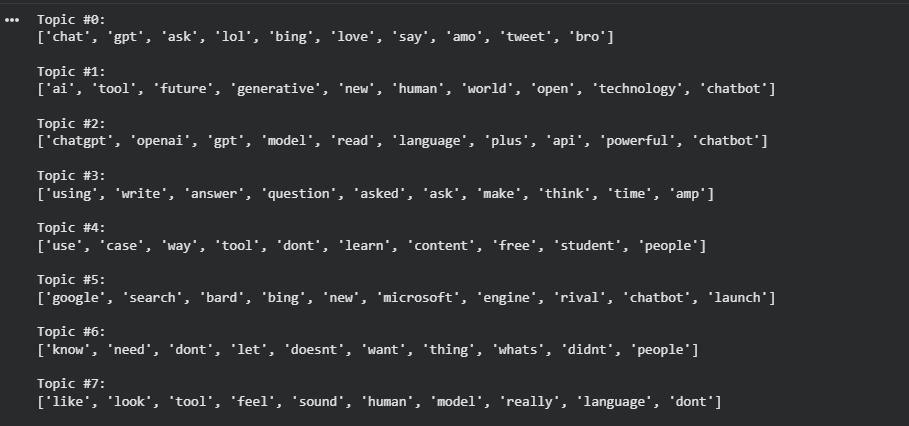
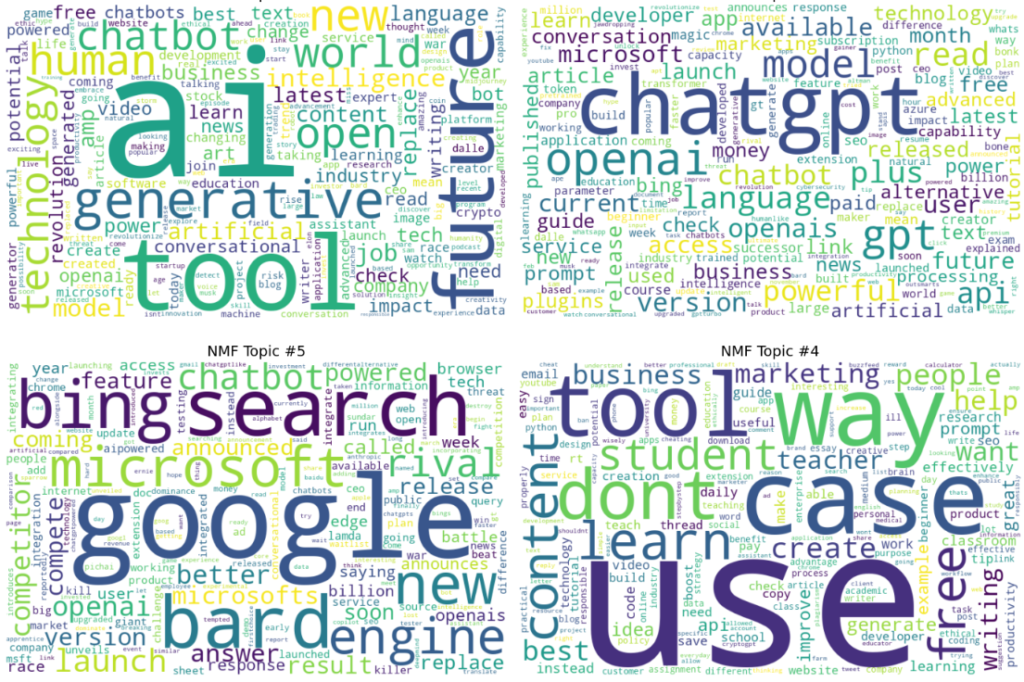
In this output, several themes appear more clearly defined, such as direct comparisons with Google and Bing, discussions around specific products and APIs, practical usage scenarios, and everyday reactions expressed in informal language. Because TF-IDF reduces the influence of very common terms, NMF is better at separating concrete use cases, platform rivalries, and hands-on interactions with ChatGPT. This makes the model particularly useful for understanding detailed sub-conversations within a large and noisy dataset.
Taken on its own, the NMF model provides a more detailed view of how people talk about ChatGPT in practice. In the next section, I combine the insights from both LDA and NMF to show how these two approaches complement each other and offer a more complete picture of the overall conversation.
Combining LDA and NMF Insights
Looking at the results side by side, LDA and NMF reveal complementary views of the same conversation. LDA provides a high-level structure by grouping tweets into broad thematic families, such as market impact, education, content creation, and the broader future of AI. This makes it useful for understanding the overall landscape of how ChatGPT is discussed and which major narratives dominate the conversation.
NMF, on the other hand, zooms in on more concrete and practical discussions. By using TF-IDF, it highlights specific use cases, product comparisons, platform rivalries, and everyday interactions expressed in more informal language. Topics related to search engines, APIs, Microsoft and Google, and hands-on usage scenarios appear more clearly separated. These themes are narrower, more focused, and often closer to how users actually describe their experiences.
When combined, both models offer a more complete picture. LDA answers the question “What are the main themes people talk about?” while NMF helps explain “How are people talking about them in practice?” Together, they reduce the risk of oversimplifying the conversation and allow us to move from abstract themes to actionable insights. This combination is especially useful in real-world analytics, where understanding both the big picture and the details is essential.
import numpy as np
import matplotlib.pyplot as plt
from wordcloud import WordCloud

# 1) Choose 3–4 topics to display (change these indices if you want)
topics_to_plot = [1, 2, 5, 4]  # example: AI future, OpenAI/API, Google/Bing rivalry, Use cases

# 2) Feature names and NMF topic-word weights
feature_names = tfidf_vectorizer.get_feature_names_out()
W = nmf_model.components_  # shape: (num_topics, num_terms)

def topic_word_dict(topic_idx, top_n=150):
    """Return a dict {word: weight} for the selected topic."""
    topic_weights = W[topic_idx]
    top_ids = topic_weights.argsort()[-top_n:]
    return {feature_names[i]: float(topic_weights[i]) for i in top_ids if topic_weights[i] > 0}

# 3) Plot 2x2 wordclouds
fig, axes = plt.subplots(2, 2, figsize=(14, 10))
axes = axes.ravel()

for ax, t in zip(axes, topics_to_plot):
    wc = WordCloud(width=800, height=500, background_color="white")
    wc.generate_from_frequencies(topic_word_dict(t, top_n=200))
    ax.imshow(wc, interpolation="bilinear")
    ax.set_title(f"NMF Topic #{t}", fontsize=14)
    ax.axis("off")

plt.tight_layout()
plt.show()
6. Final Conclusions and Takeaways
One important thing to clarify is that the models did not automatically decide how many topics existed in the data. I explicitly chose how many topics to extract. This is an important mindset shift when working with topic modeling. The goal is not to find a single “correct” answer, but to explore the conversation at different levels of detail. Asking for more topics gives a finer breakdown, while fewer topics produce broader themes. The value comes from selecting a level of granularity that helps make sense of the conversation, not from assuming the model discovers an absolute truth.
Another key takeaway is that topic modeling does not produce finished answers by itself. Both LDA and NMF return groups of keywords, and turning those keywords into meaningful themes still requires human interpretation. This is not a limitation, but part of the process. The model highlights patterns in the data, and the analyst adds context and understanding. The real insight emerges from combining machine-discovered structure with human perception.
Looking at both models together helped strengthen the analysis. LDA was useful for identifying the main thematic foundations of the conversation, while NMF helped confirm and sharpen those themes using more concrete language. When both models point in the same direction, confidence in the results increases. In practice, focusing on a small set of overlapping themes shared by both models proved more valuable than trying to interpret every single topic in isolation.
From the results themselves, several clear narratives stand out. One of the strongest themes is the idea of ChatGPT as a potential alternative to traditional search engines. Across many tweets, users compare ChatGPT to Google and Bing, framing it as a new way to search for information, ask questions, and get explanations. Given Google’s long-standing dominance in search, the presence of this theme suggests a meaningful shift in how people think about information discovery.
Another strong pattern is the emphasis on practical use. Many topics revolve around writing, coding, education, content creation, and everyday productivity. This shows that ChatGPT is not discussed only as a futuristic or experimental technology, but as a tool people actively use to solve real problems. The conversation is driven less by abstract speculation and more by immediate usefulness, which helps explain its rapid adoption.
At a broader level, this project shows why topic modeling is valuable beyond the technical details. These techniques make it possible to summarize what people are talking about when a broader subject dominates the conversation. Instead of reading thousands of tweets individually, we can extract a small number of themes that describe the collective discussion. From a business perspective, this turns noise into structure and scattered opinions into patterns that are easier to understand and act upon.
There are also several ways these results could be refined or validated without moving directly to large language models. Topic coherence metrics can help assess topic quality, alternative preprocessing strategies can improve clarity, embeddings combined with clustering can reveal deeper semantic structure, and simpler methods like keyword co-occurrence or association analysis can support the findings. Often, improving how the data is represented and filtered adds more value than increasing model complexity.
Finally, these techniques are not limited to Twitter. The same approach can be applied to customer feedback, surveys, support tickets, call transcripts, internal documents, or any large collection of open-ended text. In social media, topic modeling is especially powerful for understanding public opinion around political issues, brands, or products. More broadly, it provides organizations with a scalable way to listen to large populations, understand recurring concerns, and make better-informed decisions based on what people are actually saying.
Leave a Reply